Every figure a promoter, a CFO and an accountant need is already inside Tally. Getting it out is the problem. vCFO Cockpit reads the ledgers directly, rebuilds the statements, works out where GST, TDS and PF stand — then answers questions in plain language and does the work the answer implies, from a chase list to a 2B reconciliation.
The demo runs on a sample manufacturing company. No sign-up, nothing to install.
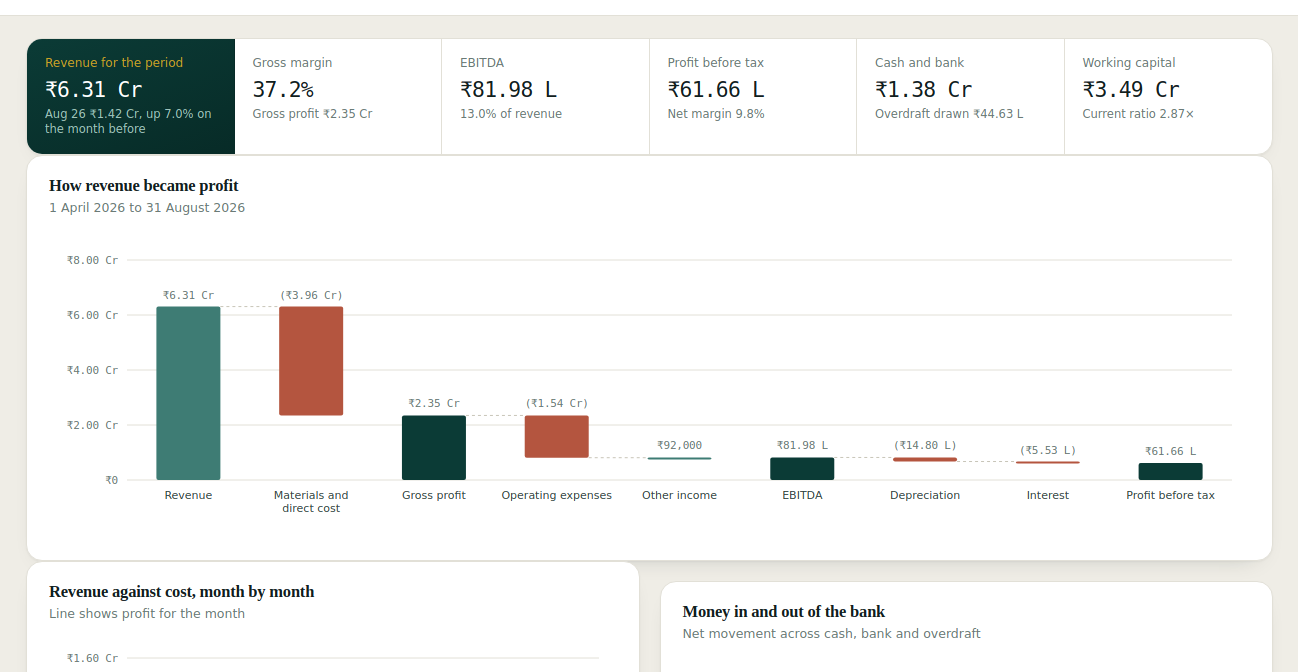
Five months to 31 August
Gross profit ₹2.26 Cr
₹35.75 L past 90 days
Overdraft drawn ₹44.63 L
Before the period can close
Live figures from the demo company, read from its ledgers — not typed into this page.
vCFO changes what it is doing depending on what you ask. The same books, read four different ways — and every answer is pulled from your ledgers at the moment you ask, never from a cached summary.
Suspense balances, duplicate voucher numbers, negative cash, receipts sitting on-account that break bill-wise agreement, vouchers dated after the period, journals with no narration, customers with an open balance and no GSTIN.
Listed in the order an auditor works, with the ledger and voucher number attached, so the fix takes minutes rather than an afternoon of hunting.
The bridge from revenue to profit before tax, month-by-month revenue against cost, bank movement, the working capital cycle with the rupee value of a single day, revenue concentration, and balance sheet strength.
Which customers to chase first and why, whether the margin problem is price or mix, what a week of payments should look like, where working capital is trapped.
Group and total anything — spend by supplier, revenue by voucher type, month over month — and get it back as a chart, a table, or a spreadsheet you can download.
“Which customers should I chase first?”
₹2.41 Cr is outstanding across 9 customers, and ₹35.75 L of it is past 90 days. Start with these three. They are not the largest balances in every case — they are the ones where the money is oldest, which is where collection gets harder every week you wait.
The drafts are deliberately short and ask a question rather than making a demand, because the usual reason an old bill sits unpaid is a missing document rather than a refusal to pay.
GST, income tax and payroll are where a small company gets hurt — not in the management accounts. Each has its own screen, built from the same vouchers, and each says plainly what it cannot know.
Output tax on sales against input credit on purchases, month by month, with the next GSTR-3B laid out as the books currently stand — outward supplies split B2B, B2C and zero-rated export, inward credit taken, net payable.
Load the portal's own GSTR-2B and it reconciles the inward side: matched, value mismatch, GSTIN mismatch, period mismatch, in the books but not on the portal, on the portal but not in the books, duplicates. It tells you how much ITC is safe to claim now and how much is held back, with an exception list ordered by what it costs to leave alone.
Load the filed GSTR-1 and it does the outward side too — what was declared against what the sales register carries. An invoice raised and never reported is the expensive one: tax already collected, not yet declared, accruing interest quietly.
Both are read straight from the files the portal gives you, Excel or JSON, on your own machine. Tested against real returns — a 2,178-row GSTR-1 reads in a fifth of a second, and the ITC totals agree with the portal's own summary to the paisa.
It does not reconcile the other way round. 2B is what your suppliers reported, not your purchase register — the credit comes from a valid purchase, then gets matched, never the reverse.
Profit run rate annualised, the charge built up step by step through surcharge and cess, TDS already deducted by your customers set against it, and the four advance tax instalments with the cumulative percentage each one carries.
TDS you deduct is broken out by section with its due date. Where the projection would be a guess — a disallowance, a depreciation difference, income the books have not seen — the screen says so rather than pretending.
Heads on the roll, gross, PF on both sides, ESI for those covered, TDS on salary, and the cash the next run will need. Each filing carries its own due date — ECR and ESI by the 15th, section 192 by the 7th.
The figures are read from what was actually posted, not recomputed from statutory rates, so a difference between the two is visible instead of hidden.
Nothing here is a Tally report re-skinned. The trial balance, profit and loss, balance sheet, ageing, ratios and every statutory figure are rebuilt from the ledger and voucher objects, which is why they keep working across Tally releases.
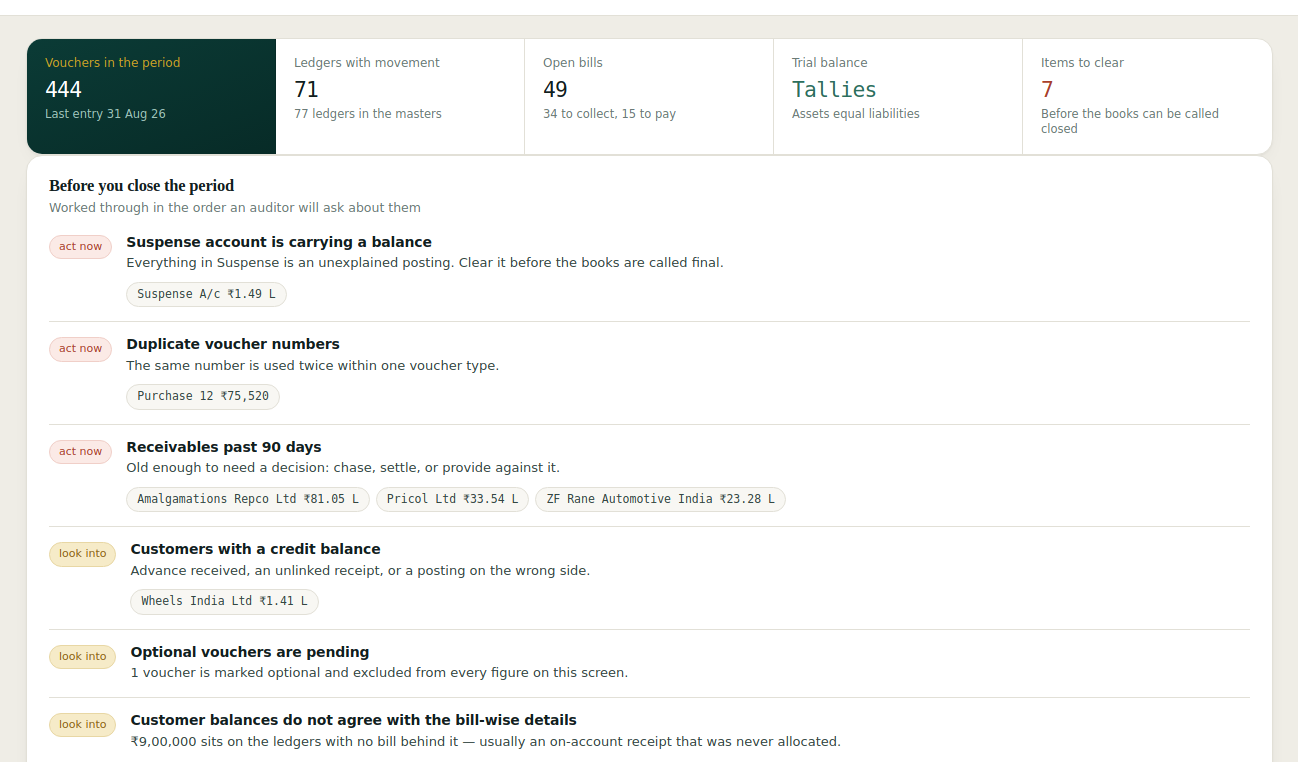
Accountant dashboard. Built around the close. Every finding carries the ledger, the voucher number and the amount, ordered the way an auditor will ask about them — suspense first, then duplicates, then the bill-wise mismatches that make an ageing report wrong without moving the profit.
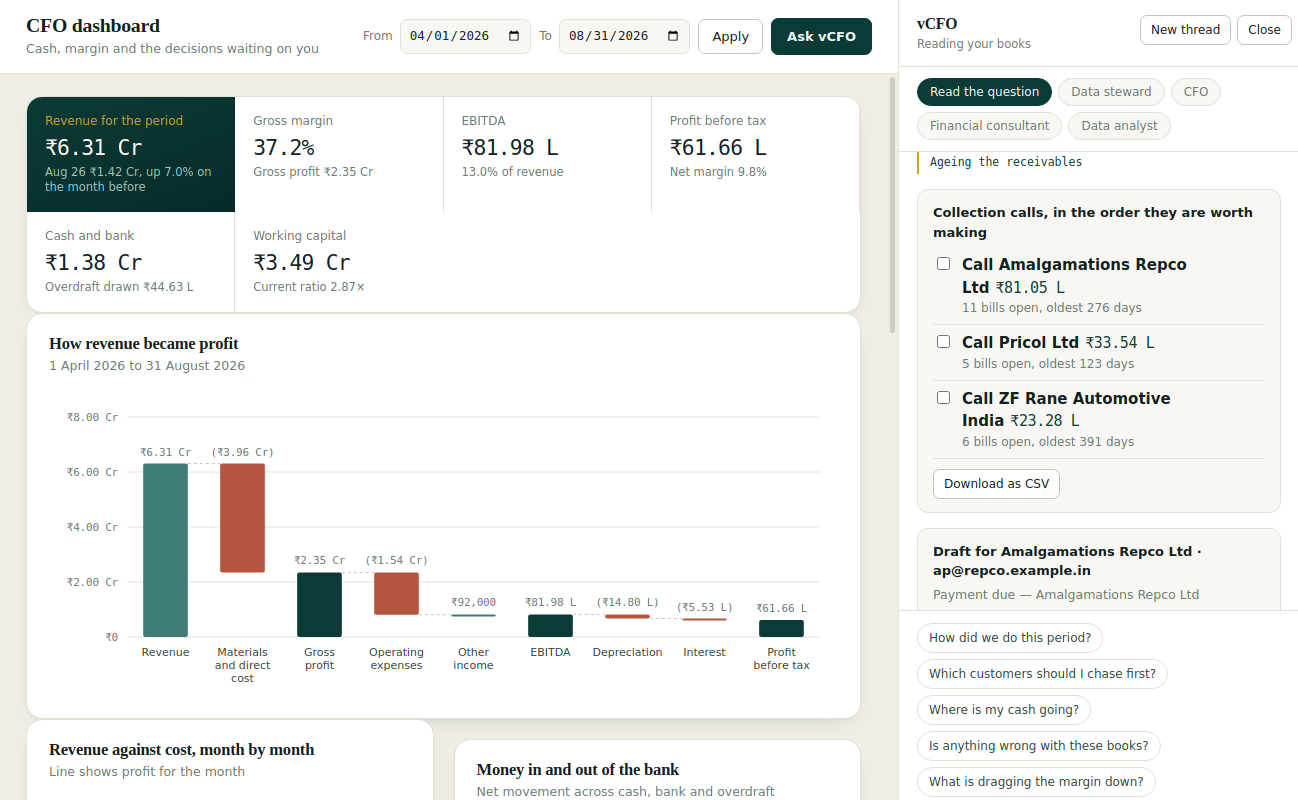
vCFO answering. It fetches before it answers — the faint gold lines are the tools it called — and then builds the thing you actually needed. Here, a call list ordered by age of money and a drafted note for each customer.
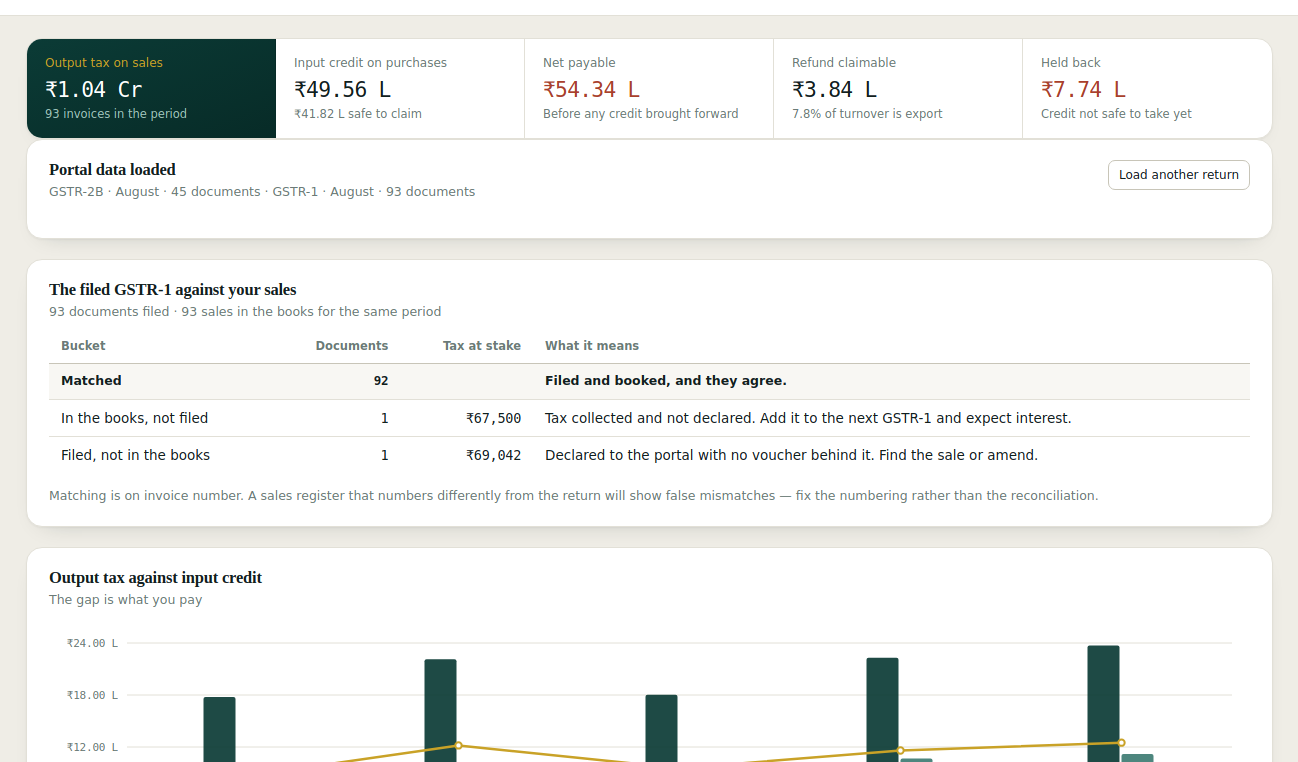
GST. What is due, what is claimable, and what the portal disagrees with — inward against 2B, outward against the filed GSTR-1. The badge in the rail counts open exceptions.
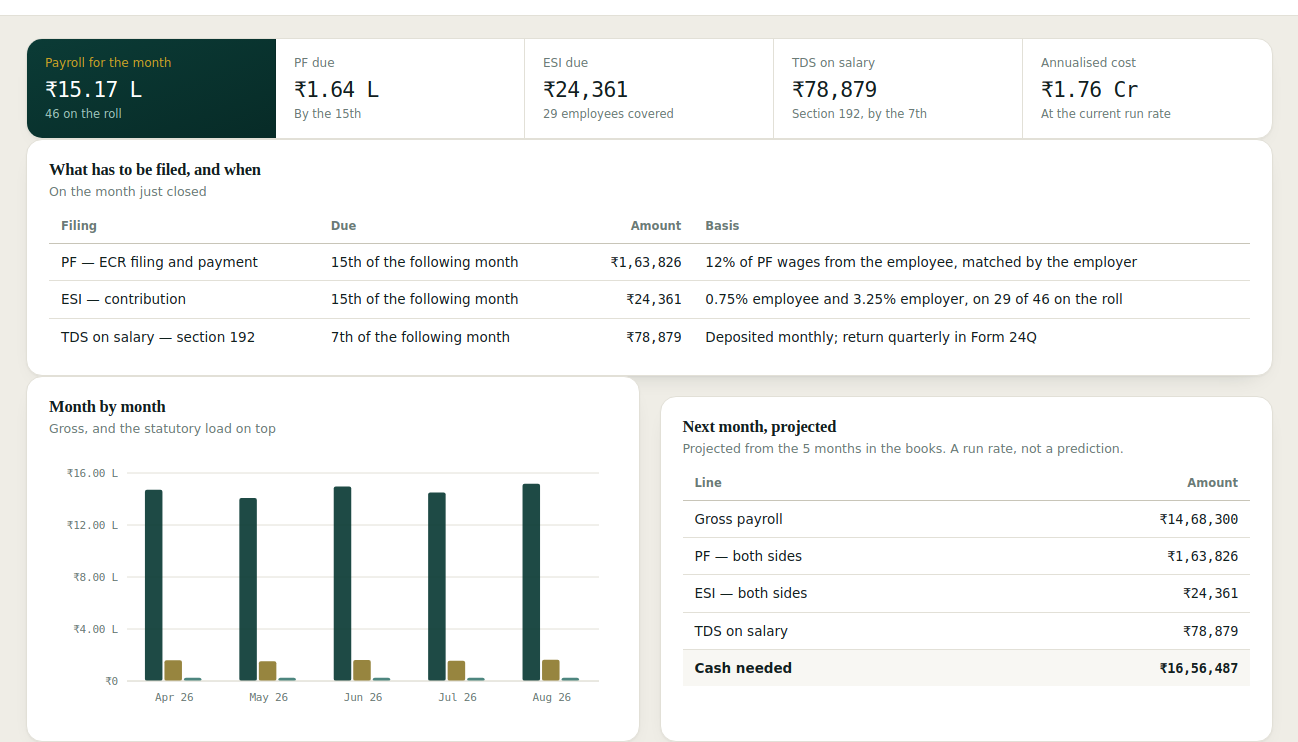
Payroll. PF, ESI and section 192 with their due dates, and the cash the next run will need.
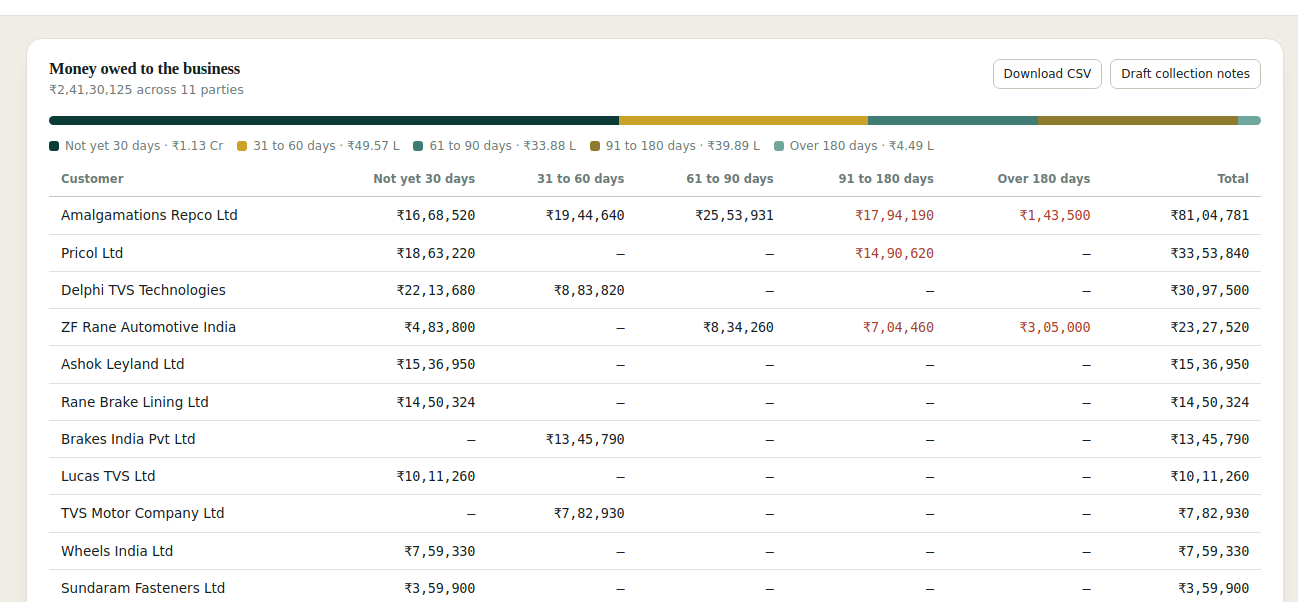
Receivables. Aged by bill rather than by ledger balance, so the buckets survive part payments and on-account receipts. Click any row for the bills behind it.
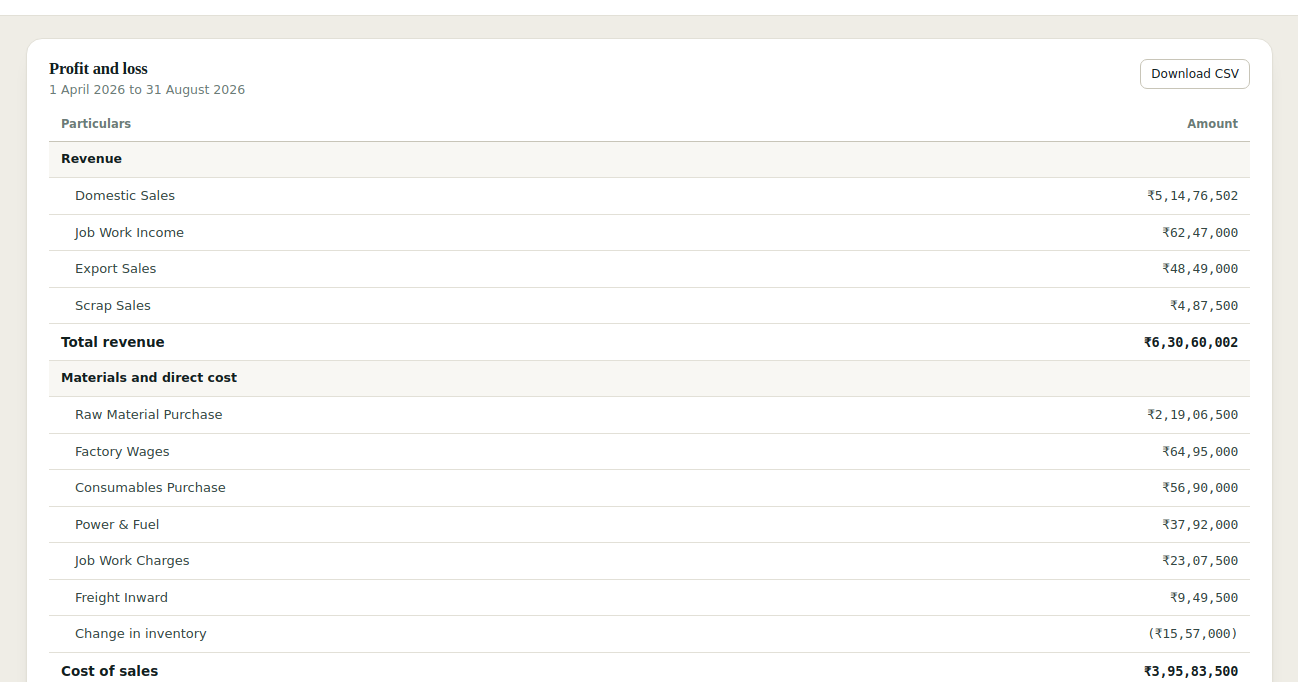
Statements. Set like statements — hairline rules, aligned figures, a double rule under the grand total — and out to CSV or PDF when someone needs a copy.
On the machine that already has TallyPrime on it. Your books never leave the building, because there is nowhere for them to go.
A single Windows application. No server, no database, no cloud account, and no change to how anyone enters vouchers.
In TallyPrime: F1 → Settings → Connectivity, set it to act as Both on port 9000. That is the whole configuration.
Pick the company and the period. The dashboards fill in, and vCFO can answer anything the ledgers can support.
It only reads. vCFO Cockpit never writes a voucher back into Tally. It drafts messages for you to send and builds lists for you to work; it does not send or post anything itself. Write-back is deliberately absent until there is an approval step and an audit trail worth trusting.
Your data stays put. The books are read over Tally's own XML interface on the local machine. Nothing is uploaded, and there is no account to create. Only the question you type and the figures needed to answer it are sent to the language model, and only when you ask.
About this demo. It runs on a generated sample company — Vaigai Precision Components, a fictional auto-components firm with five months of vouchers. Because it is a static page with nothing behind it, vCFO answers from a set of prepared questions here. The figures inside those answers are read live from the sample ledgers, with the same tools the installed version uses. Installed, there is no script.
A walkthrough takes about thirty minutes, on your Tally data or ours. Tell us roughly what you run on and we will come back with a time.